Canopy workflow
Capture consistently across different jobs.
Use one repeatable record structure for tree surveys, inspections, photographs, works and priorities, while keeping the project context attached.
For arboricultural consultants
Keep the survey, tree register, assessment, photographs, recommendations, map and report connected across the job.
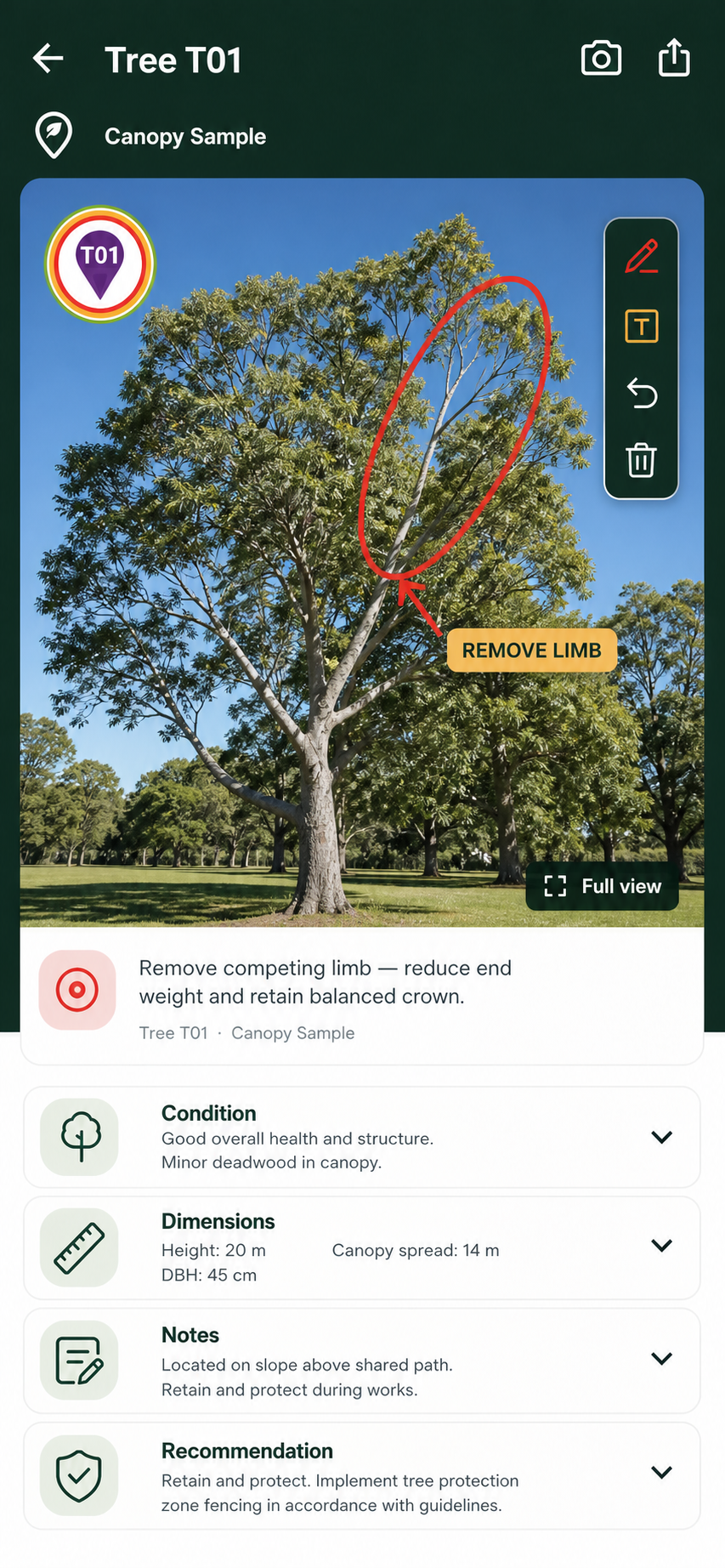
Canopy workflow
Use one repeatable record structure for tree surveys, inspections, photographs, works and priorities, while keeping the project context attached.
Canopy workflow
Use tree detail fields, encroachment percentages, photo markup and captions to explain what was observed and what is recommended.
Canopy workflow
Move from a living inventory to maps, CSV schedules and PDF reports without rebuilding the work in several disconnected tools.
Canopy workflow
Review a small sample of your normal tree records, photographs, maps and report outputs on the devices you intend to use. Record the checks that matter to your client handover before choosing a subscription.
Useful answers
Canopy is designed around arboricultural fieldwork and may also suit related environmental, landscape and tree-management teams where the supported workflow fits.
Canopy provides structured data and outputs; professional judgement, report wording and final sign-off remain with the practitioner.
Open Canopy in your web browser or install the Android app from Google Play. Native iOS availability is a separate future release; iPhone users can evaluate the browser workflow.
Product conversation
Tell us what you survey, inspect or report today and we can show you how the workflow maps across.